Label Software for Small Manufacturers

Enterprise-grade labels without enterprise complexity. Cloud-based, starts free, scales with production.

No installs required
8 barcode formats
Free plan available
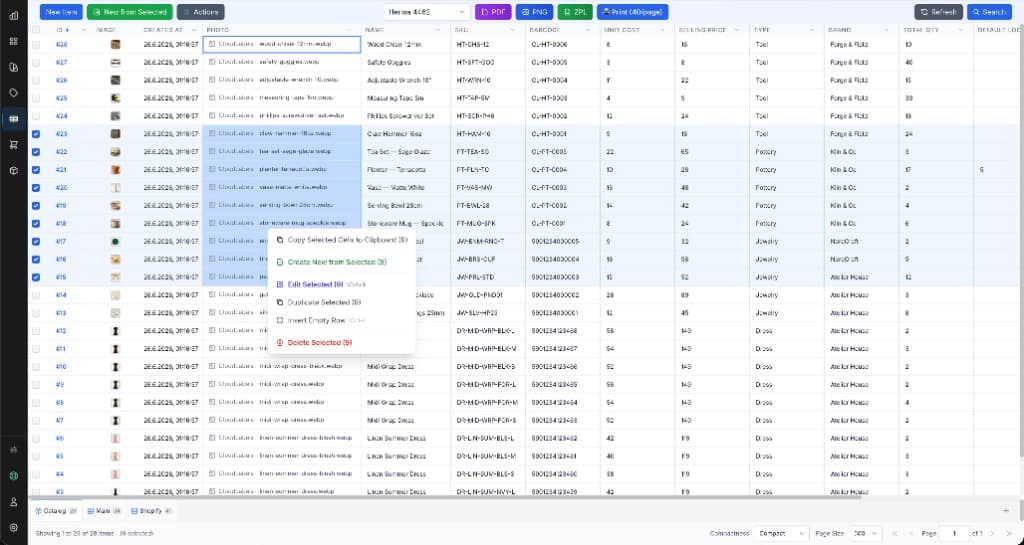
Cloudlabels label software for small manufacturers — design and batch print in the browser

Labels You Can Create

🏭

Product Identification Labels

Print SKUs, product names, and barcodes on every unit so lines, warehouses, and customers always know what they are handling.

📋

Batch & Lot Labels

Track production runs with batch, lot, and date codes for recalls, quality checks, and regulatory traceability.

⚙️

Component Labels

Label parts, subassemblies, and kits with serials or internal codes so assembly and rework stay accurate.

📦

Packaging Labels

Outer carton and inner pack labels with the right data for shipping, 3PL handoff, and shelf-ready presentation.

Compliance Labels

Include required text, symbols, and GS1-friendly barcodes so your labels align with industry and retailer rules.

🔢

Serial Number Labels

Generate unique serials across a run from your data—ideal for warranty, service, and asset tracking.

Why Small Manufacturers Choose Cloudlabels

Batch Processing

Generate full production runs from your item table: one design, thousands of unique labels in a single export.

Excel & CSV Import

Pull BOMs, work orders, or ERP exports into Cloudlabels—map columns once and keep labels in sync with production data.

8 Barcode Formats

EAN-13, UPC-A, CODE-128, Code 39, DataMatrix, GS1 DataMatrix, EAN-8, and UPC-E—cover retail, logistics, and traceability.

Avery & HERMA Templates

Print on the sheets you already buy—pick a template and get aligned PDFs without fighting desktop drivers.

Cloud-Based (No IT Overhead)

Runs in the browser—no installs, no servers to patch. Your team signs in and prints from the shop floor or office.

Up to 1200 DPI Export

High-resolution PDF output for thermal, laser, and professional presses—crisp barcodes and fine text on every run.

Perfect for Every Manufacturing Operation

🍽️

Food & Beverage

Lots, dates, and ingredient clarity

💡

Electronics Assembly

Serials, SKUs, and ESD-friendly data

💊

Cosmetics & Health

Compliance text and traceability codes

🎨

Craft & Artisan

Small batches with a professional finish

Start Printing Production Labels Today

Move from spreadsheets to print-ready PDFs—without enterprise label software or IT projects.

Frequently Asked Questions

Many small teams switch from desktop label suites to Cloudlabels for simpler rollout: no per-seat installs, cloud access from any PC, and batch printing from Excel or CSV. You still get professional templates, barcodes, and print-ready PDFs—without maintaining local print servers.
Yes. Import Excel or CSV, map columns to fields on your label, and export a single PDF with one label per row. Update the sheet and re-print whenever a run changes.
No dedicated infrastructure is required. Cloudlabels runs in the browser; you export PDFs and print with your existing printers and drivers, the same way you would from any PDF.
Cloudlabels supports eight formats, including CODE-128 and DataMatrix for internal and traceability use, and EAN-13/UPC for retail-ready cartons and sellable units. Pick the symbology that matches your customers and compliance needs.
Yes. Choose a supported sheet template so each label lands on the correct die-cut position. That reduces misalignment compared to manual layout in generic design tools.
Yes. Start on the free tier to prove the workflow with your data and printers, then scale when volumes or collaboration needs grow.
Cloudlabels exports high-resolution PDFs—up to 1200 DPI—so barcodes and small text stay sharp on thermal and laser devices. Always test a short run on your hardware when you change stock or printer settings.